01
Start with what they know.
Take a clear photo of a school worksheet or choose one from your gallery.
A little more practice. A lot less prep.
Take a photo of a worksheet or homework assignment. Get a fresh set of similar exercises for children in grades 1–4, ready to save as a PDF and print.
 Coming soonGoogle Play
 Coming soonApp Store
Android is coming first. iOS will follow.
Math · Grade 2
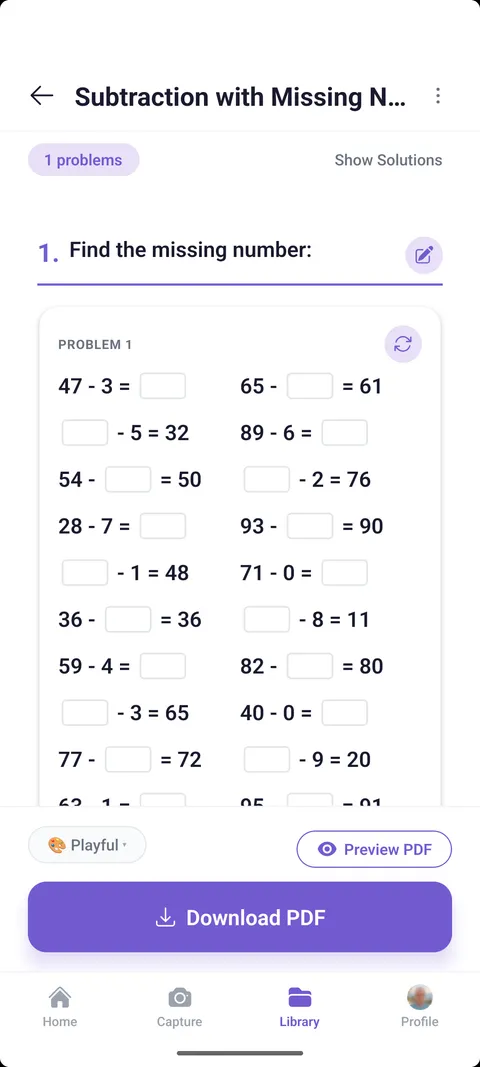
From a photo to paper
Take a clear photo of a school worksheet or choose one from your gallery.
Choose the grade and preferences, then review and edit the new exercises before printing.
Export a PDF, choose a style, and let the next bit of learning happen on paper.
Math · Grade 2
Illustrative preview · content is reviewed by a parent before use.
Less searching. More learning.
No need to hunt for another worksheet on the same topic. Start with the schoolwork in front of you and create a fresh set of similar tasks.
A helpful little toolkit
Set a grade from 1 to 4 and choose preferences before preparing practice.
Use hints and solutions to support practice and check the work together.
Edit a task or generate a new version of one exercise or the whole worksheet.
Save worksheets to your cloud library and come back when it is time to practice again.
Choose Playful, Classic, or Minimal PDF styles — including a black-and-white option.
Create extra practice for math, English language arts, science, and other elementary school subjects — starting with their schoolwork.
FAQ
For parents and caregivers preparing extra practice for children in grades 1–4. An adult manages the app; children can work on the printed worksheets.
Yes. Sign in to use the app and keep your saved worksheets in your library.
Yes. Export your worksheet as a PDF, then print it using your usual printer or print service.
Math problems, reading comprehension, spelling, science questions, and more. Take a photo of a school worksheet or homework assignment to create similar exercises on the topic your child is learning.
Worksheeter uses artificial intelligence (AI) to prepare similar exercises from your photo. You stay in control: review the tasks, hints, and solutions before printing, and edit or create a new version whenever needed. AI can make mistakes, so always check the worksheet before giving it to your child.
Worksheeter
You prepare it. They practice on paper.
Coming soonGoogle PlayComing soonApp StoreAndroid is coming first. iOS will follow.